Cordones gordos
9,99 €
¡Encontraremos la longitud perfecta para ti!

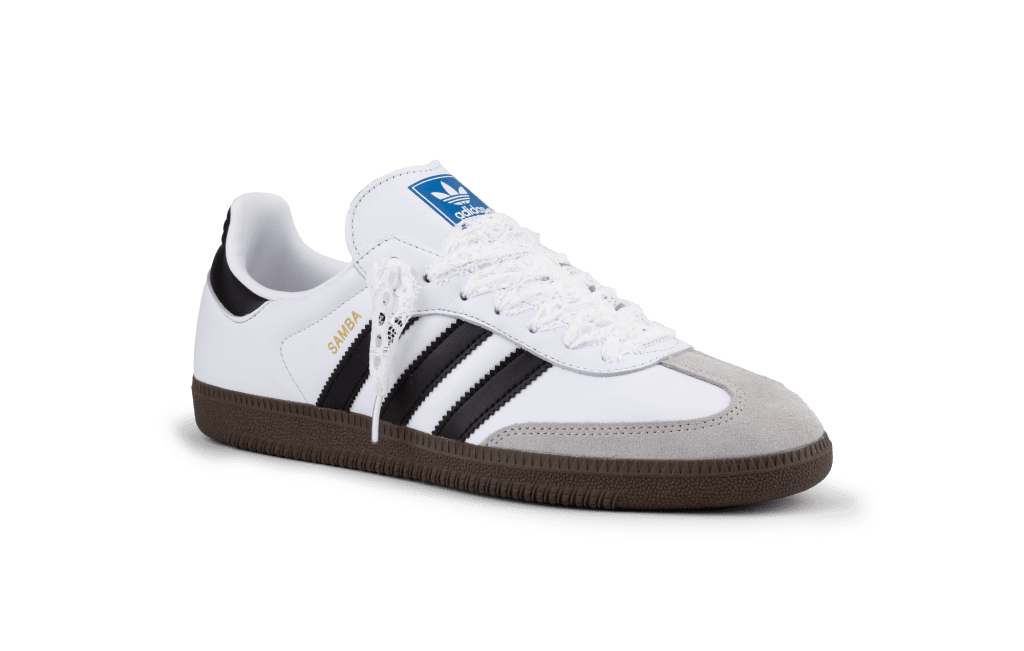
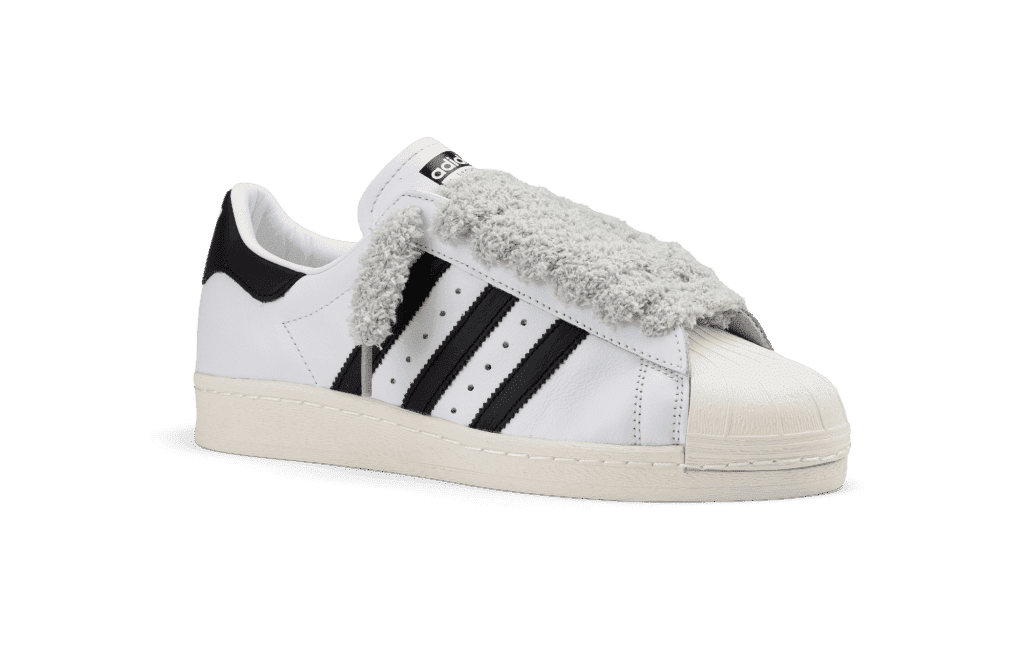
Fat Laces by BAGGY – Cordones anchos para zapatillas con carácter
Nuestros Fat Laces están hechos para aquellos que quieren darle a su zapatilla un aspecto atrevido. Con su amplia estructura y su llamativa presencia, transforman cualquier par de Adidas Campus, Vans o Nike Air Force 1 en una verdadera declaración.
Ya sea que los ate con fuerza o los use abiertos sin apretar, los cordones gordos se ajustan firmemente, son duraderos y se sienten de alta calidad. El diseño plano y ancho aporta un aspecto grueso inconfundible, que es especialmente eficaz en zapatillas como las Adidas Campus.
Nuestros cordones están disponibles en muchos colores, perfectos para combinar con tu ajuste o como un toque destacado en contraste. La superficie está ligeramente estructurada, procesada de forma robusta y garantiza una sujeción segura.
Ventajas de un vistazo:
- ✅ Cordones gruesos para modelos clásicos
- ✅ Cordones anchos para Adidas Campus, Vans y Nike Air Force 1
- ✅ Ajuste de primera calidad, fácil de usar, material duradero
Muestra actitud. Mostrar color. Con BAGGY
Volumen de suministro
Obtienes todo lo que necesitas para un par de zapatillas: cordones para las zapatillas izquierda y derecha.
Tenga en cuenta que las zapatillas que se muestran no están incluidas.
¿Más preguntas?
- Envío 2-4 días laborables 2,99€ – Nacional
- Envío 4-7 días laborables 5,99€ – Internacional
¿Más preguntas?
Material: Poliéster de dos capas, especialmente resistente al desgarro y dimensionalmente estable.
Cuidados: Lavar a mano con un paño suave y agua tibia. Deje secar al aire.
¿Más preguntas?
[data-attribute_name="attribute_color"] .button-variable-item span{
  display:none
}

.length-custom-text{display:none}


[data-attribute_name="attribute_color"] li {
  width: 80px !important;
  height: 80px !important;
  border-radius: 10px !important;
  border: solid 0px white !important;
  background:#F6F6F6 !important;
  margin-right:5px !important;
}

[data-attribute_name="attribute_color"] li.selected {
  border: solid 0px black !important;
  background:#F6F6F6 !important;
}


#ohowwx img{
  width:90px
}
[data-wvstooltip]:hover:before,
[data-wvstooltip]:hover:after{
  display:none
}
ul[data-attribute_name="attribute_color"] li{
  position:relative;
}

ul[data-attribute_name="attribute_color"] a{
  position:absolute;
  top:0;
  left:0;
  width:100%;
  height:100%;
  z-index:10
}
// IMG LIGHTBOX REMOVE LINKS HREFS
document.addEventListener('DOMContentLoaded', function() {
// Select all anchor elements inside .woocommerce-product-gallery__image divs
document.querySelectorAll('.woocommerce-product-gallery__image a').forEach(anchor => {
// Remove the href attribute from the anchor tag
anchor.removeAttribute('href');
});
});
// IMG CLICKS IDS
document.addEventListener("DOMContentLoaded", function() {
// Handle images with spaces in their id attributes (run this immediately)
const images = document.querySelectorAll('img[id]');
// Iterate through each image element to normalize IDs first
images.forEach(function(img) {
// Get the id of the image
let imgId = img.getAttribute("id");
// Replace spaces with hyphens and normalize to lowercase
const validImageId = imgId.replace(/s+/g, '-').toLowerCase();
// Set the new ID with hyphens to the image element (making it valid)
img.setAttribute("id", validImageId);
});
// Delay the execution of the image-related logic to ensure that IDs are replaced before looking for them
setTimeout(function() {
// Select all li elements inside ul with data-attribute_name="attribute_color"
const listItems = document.querySelectorAll('ul[data-attribute_name="attribute_color"] li');
// Iterate through each li element
listItems.forEach(function(li) {
// Get the value of the data-title attribute
let dataTitle = li.getAttribute("data-title");
// If data-title exists, proceed
if (dataTitle) {
// Normalize by replacing spaces with hyphens to create a valid ID selector for both li and image
const validId = dataTitle.replace(/s+/g, '-').toLowerCase();
// Find the corresponding image by normalized ID (replace spaces with hyphens in the image id too)
const imgElement = document.querySelector(`img[id="${validId}"]`);
// If the image element exists, clone it inside the li
if (imgElement) {
// Clone the image element
const clonedImage = imgElement.cloneNode(true);
// Append the cloned image inside the li element
li.appendChild(clonedImage);
} else {
// Log an error if the image doesn't exist (for debugging purposes)
console.error(`No image found for ID: ${validId}`);
}
// Add a click event listener to scroll to the target element
li.addEventListener('click', function() {
// Find the element with the corresponding normalized ID
const targetElement = document.querySelector(`#${validId}`);
// If the element exists, scroll to it with an offset
if (targetElement) {
// Get the top position of the target element
const elementPosition = targetElement.getBoundingClientRect().top + window.scrollY;
// Scroll to the element's position minus 130px for the offset
window.scrollTo({
top: elementPosition - 130, // Adjust the scroll position by -130px
behavior: 'smooth' // Smooth scroll
});
}
});
}
});
}, 300); // Wait for 300ms before running the image insertion logic
});